
Connecting a model service
A provider tells Wuu where to send model requests and which credentials to use. A model is an identifier accepted by that provider. You can keep several models under one provider without duplicating its connection settings.
These settings apply to the Wuu engine. Selecting an external engine, such as Codex, Claude Code, or Devin, runs that program with its own authentication and configuration. Reusing a subscription credential in a Wuu provider is a different choice from running the corresponding external engine.
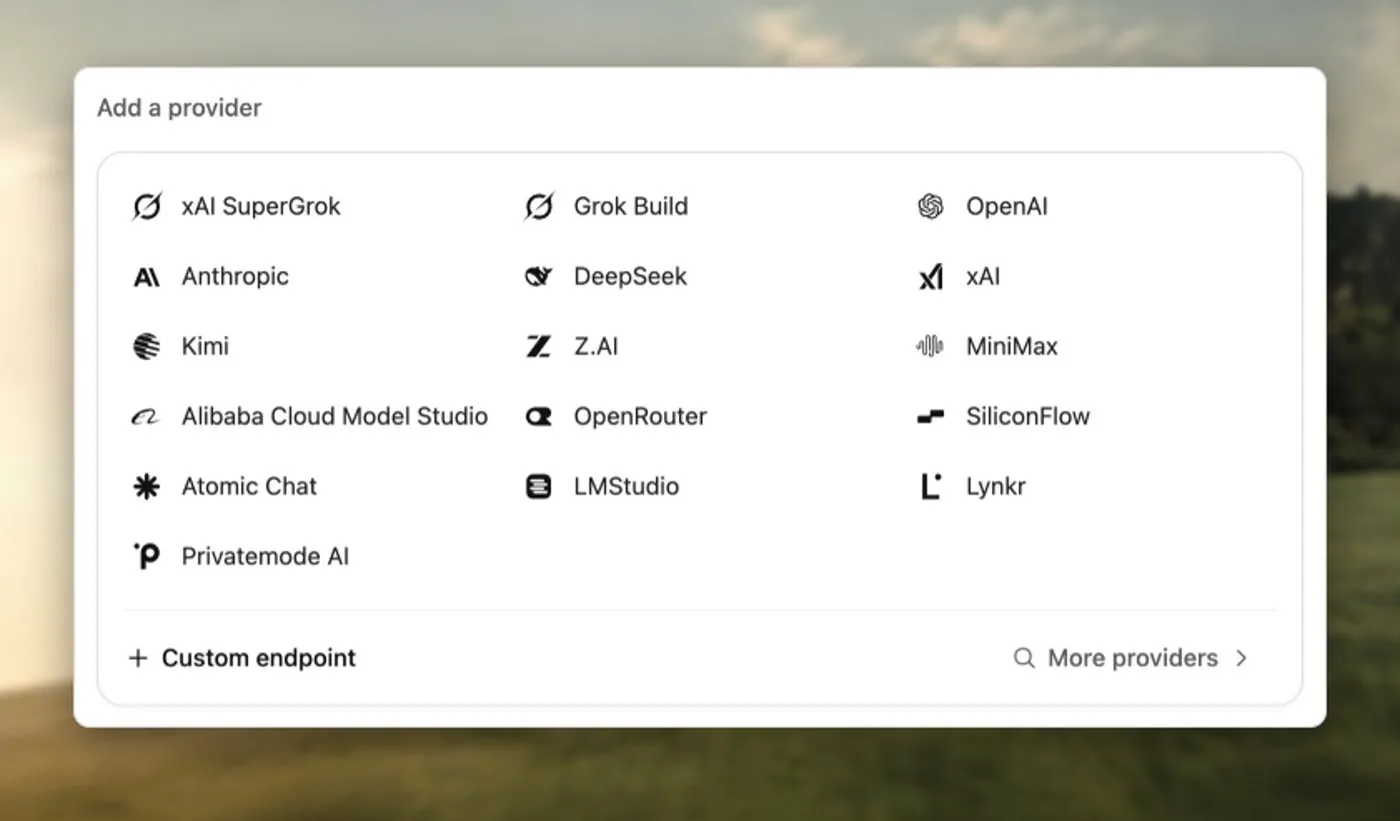
Choose the API type, then enter the provider identifier, model, and credentials.
Add a provider in the desktop app
Section titled “Add a provider in the desktop app”- Open Settings → Model connections → Add provider.
- Choose the service type. Use OpenAI-compatible or Anthropic-compatible for a service that implements that API.
- Enter an identifier, an available model ID, the API endpoint, and credentials. Include an API prefix such as
/v1when your service requires it. - Save the provider, return to the composer, and select the provider and model for the conversation.
- Send a small request that includes a tool call, such as reading a project file, to check more than text-only replies.
First-run setup lists detected local Codex and Grok logins together. Select a login to connect it and use it as the default model service, or connect another service. Existing connections do not hide these choices. Use Settings for additional model options. A model listed in a configuration is not a guarantee that your account can access it.
The composer’s selection belongs to the conversation, or to the draft before its first message. Settings also lets you set workspace defaults; changing a conversation’s model does not silently replace those defaults.
For Anthropic-compatible connections, an explicit credential in configuration (or its named environment variable) takes priority over a saved credential. Selecting either source prevents an unrelated ambient API key or bearer token from being added to the request. Explicitly configuring both headers remains supported. Saving a new API key in Settings replaces the previous bearer token, including its configured environment-variable reference.
Manage providers and models
Section titled “Manage providers and models”Open a connected provider in Settings → Models & services. Add model accepts a model ID without duplicating the provider or its credentials. The trash icon removes a model from that provider’s choices. Removing the selected model asks you to choose its replacement before saving; add another model first if it is the only one.
Removed choices stay removed after reloading or refreshing the catalog. You can restore them from Removed models. Existing conversations, model roles, and aliases keep their model selections and metadata; removing a choice does not revoke model access or erase conversation history.
Use the provider’s … → Delete provider action to remove the entire connection and its provider-specific saved key. Shared subscription sign-ins are kept. Removing the default provider asks you to choose another default. Existing conversations remain and switch from the removed provider to the current default on their next turn. Roles that used it return to inherited defaults, and its aliases are removed. Add another provider before deleting the last configured provider. Automatically discovered services cannot be removed here; their authentication remains managed by the original sign-in flow. Removing a Codex connection keeps the shared ChatGPT sign-in, so other Codex connections stay signed in.
Current OpenAI and Anthropic models
Section titled “Current OpenAI and Anthropic models”The catalog includes gpt-6.1-sol, gpt-6-sol, gpt-6-luna, claude-opus-5-5, and claude-fable-5-1. Existing conversation and workspace selections remain unchanged; select a new model when you want to use it.
GPT-6.1 Sol supports low, medium (default), high, xhigh, and max; it does not support none or minimal. Tool calls require Responses, which Wuu selects when an official OpenAI connection has no explicit transport. Explicit and custom-endpoint transports remain unchanged: select Responses before using tools. Its Fast entry sends gpt-6.1-sol with priority processing at twice the standard API price; Fast is unavailable with EU data residency. Standard cached input costs $0.10 per million tokens, with higher rates above 272K input tokens. See the official GPT-6.1 Sol specification.
To use GPT-6.1 Sol through an existing Codex subscription, reuse your local Codex login and refresh the subscription model list. Wuu adds the Fast alias when the account advertises the base model; the API catalog alone does not establish subscription access. Subscription requests keep Codex authentication and the subscription context-budget policy, rather than requiring an OpenAI API key or assuming the API input limit. API prices are not subscription quota estimates. The external Codex engine continues to use its own model discovery and login.
GPT-6 Sol and Luna support reasoning levels from none through max, defaulting to medium. Their Fast entries use the same model with priority processing and a different price. Wuu defaults an unspecified official OpenAI connection to Responses for these models. If you explicitly selected Chat Completions, choose Responses for reasoning with tools; Chat Completions supports their tool calls only at none. Custom endpoints retain their configured transport. See the official Sol and Luna specifications.
Claude Opus 5.5 and Fable 5.1 always use adaptive thinking. Wuu maps a saved none selection to low; their defaults are medium and high, respectively. Wuu requests readable thinking summaries and lets the API drop thinking blocks invalidated by context changes while retaining valid signed blocks. These models reject forced tool choice, so Wuu expresses a required closing tool call as an instruction with automatic tool selection; this does not guarantee that the model calls it. See the official Opus 5.5 and Fable 5.1 migration guides.
Gemini tool compatibility
Section titled “Gemini tool compatibility”For model IDs containing gemini, Wuu adapts tool definitions to Gemini’s supported schema subset. A tool with const: 3, such as the interactive UI tool’s version field, is sent as a numeric value with equal minimum and maximum bounds. String constants use a single-value enum. This avoids 400 Invalid JSON payload / Unknown name "const" on gateways that use Google’s OpenAPI schema, while keeping numeric tool arguments numeric.
Other constant kinds retain their type and an explicit value hint; the tool must still validate the original constraint when it executes. Parameter names and literal defaults/examples are preserved. These adaptations apply to outgoing requests, without changing installed tool definitions or other models’ schemas.
Gemini’s OpenAI-compatible Chat Completions API can return an opaque thought signature on a tool call. Wuu preserves it through streaming, saved history, and interrupted tool-result recovery, then sends it back with the same call and parallel-call order. Services that require this continuation state can reject a later request with HTTP 400 when it is missing, even after earlier requests succeeded. See Google’s thought signature guidance.
Switching provider or model omits signatures from the previous origin on outgoing requests. Signatures already lost by an older Wuu version cannot be reconstructed; start a new conversation if that history is rejected. A generic invalid_request alone does not establish that a missing signature caused it.
Tencent HY4 and MiniMax M3.1
Section titled “Tencent HY4 and MiniMax M3.1”Select hy4 on Tencent TokenHub (https://tokenhub.tencentmaas.com/v1) or Token Plan (https://tokenhub.tencentmaas.com/plan/v3). HY4 accepts text and images, supports tools, and provides a 1,024,000-token context window with up to 64,000 output tokens. Wuu defaults to high; none sends Tencent’s no_think value. See the official HY4 guide and thinking parameters.
OpenRouter offers tencent/hy4 with its own limits and reasoning options: none, low, and high (default). Provider-specific limits and prices apply; the direct Tencent settings are not interchangeable with the gateway’s settings.
MiniMax connections include MiniMax-M3.1-Flash, with image and video input and a 1M context window. Reasoning is required: choose low, medium, high, xhigh, or max (default). A saved none selection becomes low. Existing M2 selections retain their metadata but are no longer advertised as new choices. See the MiniMax text-generation guide.
Catalog refreshes preserve metadata for saved selections removed from the bundled catalog. Retained metadata does not establish that a retired model is still served or included in your account’s plan.
Kimi K3.1 Pro
Section titled “Kimi K3.1 Pro”Choose kimi-k3.1-pro or kimi-k3.1-pro-highspeed on Kimi’s pay-as-you-go API (https://api.moonshot.ai/v1 or https://api.moonshot.cn/v1). Kimi Code subscriptions use k3.1-pro or k3.1-pro-highspeed instead, at https://api.kimi.com/coding/v1 or https://api.kimi.ai/coding/v1.
Both models accept images and video, support up to 1,048,576 context tokens, and require thinking with low, high, or max effort. Wuu defaults to max for the API and high for Kimi Code, following its model configuration guide; a saved none selection becomes low. Kimi Code access and the full context window depend on your membership tier. Highspeed uses about twice the subscription quota. Start a new conversation when switching from an older Kimi model. See the official API guide and Kimi Code model configuration.
DeepSeek models
Section titled “DeepSeek models”Use deepseek-flash for DeepSeek V4.1 Flash 1017, or deepseek-v4-pro for V4 Pro. The official base URL is https://api.deepseek.com; Wuu defaults these models to Responses. Anthropic-compatible connections use https://api.deepseek.com/anthropic. Both models have a 1M context window, a maximum output of 393,216 tokens, and reasoning levels none, low, high (default), and max. Flash also accepts images.
The catalog no longer advertises the retired deepseek-v4-flash and deepseek-v4-flash-vision-exp models. Saved selections using these accepted aliases retain Flash capabilities and resolve to the latest deepseek-flash; explicitly configured model choices remain until you remove them. The discontinued deepseek-chat and deepseek-reasoner IDs are not offered by the official catalog; replace saved selections with deepseek-flash. V4 Pro remains available.
In Chat Completions thinking mode, DeepSeek rejects forced tool choice. Wuu uses automatic tool selection for these reasoning variants; none retains forced tool support. Thinking mode ignores temperature. For Flash, top_p only takes effect while thinking, with an effective range of 0.95–1.0; outside thinking it is fixed at 1.0.
Catalog prices use peak USD rates per million tokens: Flash input $0.30, cached input $0.006, output $1.20; Pro input $1.32, cached input $0.044, output $3.96. Off-peak rates are half. Peak hours are Monday–Friday 01:00–04:00 and 06:00–10:00 UTC, excluding Chinese public holidays. These static catalog rates do not calculate a time-dependent bill. See the official model update, API parameters, and pricing.
Sign in with ChatGPT
Section titled “Sign in with ChatGPT”Open Settings → Model connections → ChatGPT → Continue with ChatGPT. Wuu opens OpenAI’s authorization page in your system browser and completes sign-in through a local callback. Codex CLI is not required. Choose your account and explicitly authorize ChatGPT plan usage, then select a model from that account’s live catalog before connecting. Adding a connection does not replace an existing workspace default.
Each account registration stays separate. API-key connections, ChatGPT sign-in, and Local Codex credentials are distinct methods. Existing Codex connections keep their original credential source; no automatic migration occurs. The native Codex agent still manages its own authentication.
Wuu stores OAuth credentials in the system Keychain and refreshes expiring tokens. The current secure-store implementation requires macOS. Other platforms report its unavailability rather than silently writing credentials to a file. Tokens never enter the renderer or ordinary configuration. Closing the sign-in dialog cancels the pending attempt.
Use Account and usage inside a connection to sign in again or sign out. Enable missing plan permission only through an explicit reauthorization action. Expired or revoked sessions require sign-in. Sign-out stops this process’s account requests immediately and signals other local projects to stop using the old session; the registration is retained for a later sign-in. If remote revocation cannot be confirmed, disconnect the app in ChatGPT Settings as the UI advises.
This connection uses only the public Responses API, streaming with server-side response storage disabled and full context included in each request. Model choices come from the current account, not the API-key or legacy Codex catalog. API pricing is not a measure of plan quota. This connection does not yet expose a separate remote plan-quota reading; the UI keeps it unknown rather than querying the legacy Codex quota endpoint.
See the official registration and sign-in guide and preview limitations.
Use an existing subscription
Section titled “Use an existing subscription”| Connection | Setup |
|---|---|
| Local Codex credentials | Choose ChatGPT → Use local sign-in in Models & services and explicitly approve reusing an existing file-backed Codex login. Wuu does not launch CLI sign-in or change its storage settings. Use the native Codex agent for keyring-only Codex logins. |
| xAI SuperGrok | Add an xAI SuperGrok provider and follow the browser login. For the CLI, run wuu login xai and select --provider xai-subscription. |
| Grok Build | In desktop Settings → Models & services → Grok Build, choose Sign in. Wuu runs the installed Grok CLI’s grok --no-auto-update login --oauth and shows progress, cancellation, and completion; finish authorization in the browser opened by the CLI. No CLI is installed automatically. The CLI owns its credential file, which Wuu reuses without copying tokens. On web or phone, sign in on the desktop and reopen the connection page. You can still run grok login yourself and select the detected provider or pass --provider grok-build. |
SuperGrok subscription login, Grok CLI login, and an XAI_API_KEY are separate credential sources. Use the connection that matches your account. File editing and command execution also require the selected service and model to support tool calling.
Sign-in methods and credential ownership
Section titled “Sign-in methods and credential ownership”ChatGPT offers Sign in (OpenAI’s official SIWC authorization for Wuu) and Use local sign-in (an existing file-backed Codex session). These remain distinct connections; changing the displayed method never changes the default model or copies an account into another credential store. Existing Wuu SIWC accounts can be selected without a new login. The current secure SIWC store is supported on macOS; unsupported hosts do not fall back to plaintext or Codex identity.
Grok Build offers browser login through the installed Grok CLI and a check of existing local authentication. Both use the CLI-owned source. Native engines reuse their own configuration; the local action rechecks it and does not import tokens. Direct engine sign-in is offered only through supported agent methods. Claude, Codex and OpenCode currently use their native setup instructions; DSH has no ACP account-login method and Hermes/Pi terminal setup is not an invocable Wuu login.
Anthropic permits authentication through an unmodified Claude Code binary but does not permit third-party Claude.ai token intermediation; see its authentication policy. DSH’s ACP contract does not establish provider-account login. API-key services remain API-key services unless a supported authentication integration exists.
The existing xAI subscription route is preserved separately. xAI documents OAuth integrations with named clients, but no public Wuu-specific app-registration contract has been verified. Wuu’s existing static-client route must not be represented as Wuu’s independently registered OAuth identity. Its saved xAI session is shared by xAI subscription connections, not a separate account per connection.
Check accounts and usage in the desktop app
Section titled “Check accounts and usage in the desktop app”Settings → Models & services lists configured connections once. Open a connection’s Account and usage section for its authentication and available quota details. Local agent accounts keeps external-agent credentials separate from Wuu’s model connections. Different accounts and currencies are never added together. Codex credential actions remain attached to the local Codex connection. ACP agents that need account setup offer a sign-in button; choose a method to start authentication, which may open your browser. A model-loading failure is not proof that credentials are missing, and a static CLI model list does not establish login status.
Quota readers use the selected connection’s credential source. Supported sources are legacy Codex, Grok Build, Anthropic OAuth or local Claude Code, Kimi Code, Zhipu/Z.ai plans, and DeepSeek/OpenRouter balances. Browser SuperGrok and arbitrary compatible endpoints do not currently expose supported quota details.
The page shows remaining percentages, reset times, account labels when available, and compact credential attribution. Reset countdowns keep the next renewal visible; the exact date and time zone are available in its tooltip and accessible name. Fresh observation times live in the credential tooltip; stale readings show their age directly. Missing values remain unknown; zero remaining means exhausted. Refresh after a reset or when a snapshot is over five minutes old. A temporary failure keeps the last successful observation when the reader can still identify the account, clearly marked for refresh without an active allowance meter; rejected authentication clears the old allowance. Saved observations survive restarts and cannot be reused for another account. ACP context-window occupancy and local token counts are not subscription quota. This page shows concise loading and sign-in failures rather than raw agent logs. Quota refreshes do not submit model requests, change defaults, or select a spending route. Use the refresh button to retry loading the catalog and quotas.
Configure the CLI
Section titled “Configure the CLI”Create a user configuration once:
wuu initThe file is ~/.wuu/config.json, or $WUU_HOME/config.json when WUU_HOME is set. Edit an existing file instead of running wuu init --force, which overwrites it.
Under providers, check base_url, model, and api_key_env. The generated configuration initially selects openai with GPT-6 Sol over Responses; its Anthropic entry uses Claude Opus 5.5. Replace the example model if your account needs a different one. Set the named environment variable before running:
export OPENAI_API_KEY="your API key"cd /path/to/projectwuu exec --provider openai --permission-mode read_only "Read this project and explain how to run its tests"--provider selects a configured identifier, and --model overrides the model for this run. See configuration for precedence and the limits on project-level settings.
Streaming latency
Section titled “Streaming latency”Wuu’s built-in HTTP model clients reuse a streaming connection pool across turns. The pool survives Codex credential reloads; each request still uses the current credentials. Connect, response-header and stream-idle deadlines remain separate, so connection reuse does not impose a total timeout on a long answer.
Codex defaults to stream_transport: "auto". In eligible built-in sessions,
thread creation, resume and model changes can prewarm its WebSocket before the
next send, without submitting an inference request. A compatible continuation
on the same connection sends previous_response_id plus new input. Reconnection,
changed request options or incompatible history require full context again.
Prewarming removes setup from the send path only when that connection survives
until use; it does not remove provider queueing or model computation.
An unavailable WebSocket can fall back to HTTP before submission. Once a request may have been submitted, normal recovery accounting governs any further attempt. HTTP gzip is a separate upload optimization and does not compress WebSocket messages. Keep the configured transport when testing it: forcing SSE can lose existing connection and context reuse. See the latency evaluation workflow for measurements and correctness checks.
Experimental HTTP request compression
Section titled “Experimental HTTP request compression”HTTP request gzip is disabled by default. To test an endpoint whose operator has
confirmed it accepts Content-Encoding: gzip, set
WUU_EXPERIMENTAL_REQUEST_GZIP_ENDPOINTS in the process that launches Wuu. Use a
comma-separated list of exact, complete request URLs, for example:
export WUU_EXPERIMENTAL_REQUEST_GZIP_ENDPOINTS="https://gateway.example/v1/responses"This example is a placeholder, not a claim of endpoint support. Include the full
/responses, /chat/completions, or /v1/messages path as applicable. Matching
includes the query string; host-only values, wildcards, URL userinfo and fragments
are not supported. Redirect destinations must also be explicitly listed.
API-format compatibility does not imply request-compression support.
The experiment uses fast gzip for serialized JSON bodies of at least 64 KiB,
only when it reduces bytes. The cutoff is experimental. Existing
Content-Encoding headers disable automatic compression for that request.
JSON content, token accounting, response streaming and WebSocket behavior stay
unchanged. Compression adds local CPU and memory work; fewer uploaded bytes do
not establish lower time to first token or lower model charges.
No extra retry or uncompressed resend is added for rejected gzip or connection failures. Existing recovery rules still apply. If the endpoint rejects the encoding, unset the variable and restart Wuu before retrying deliberately. This setting applies to Wuu’s HTTP model clients, not external agent engines.
Turn completion and extra requests
Section titled “Turn completion and extra requests”Wuu follows the selected API’s completion signals. A normal stop ends the turn even if the response is empty; it does not prove that the task is complete. Empty text or a commentary message alone does not trigger another billable request.
Anthropic Messages can explicitly request continuation with pause_turn. Responses-compatible services can use the optional end_turn: false extension on a successfully completed response; a missing, null, or true value does not request continuation. This extension is not required by the standard OpenAI Responses API. Chat Completions uses its own finish_reason; Wuu does not infer continuation from gateway-native reasons or fields belonging to another API. Output limits, filtering, errors, and unknown stop reasons do not by themselves request continuation.
Each continuation is another model request and may incur charges. Wuu allows up to eight consecutive automatic tool-free continuations, then reports an error if the service still requests another. Client tool execution resets this count; configured step limits and cancellation still apply. An unfinished response cannot replace conversation history as a compact summary.
Upload files independently of native media support
Section titled “Upload files independently of native media support”The desktop composer accepts images, PDFs, videos, and ordinary files. Each upload keeps its original bytes in a local working copy for seven days. The agent receives a file reference even when the selected model cannot consume that format natively, and can use permitted file tools or commands to copy, unpack, convert, or analyze it. Native media input is additional: a file path does not mean the model has seen the file’s contents. Analysis still depends on the available tools and permissions.
Ask the agent to copy or move an attachment into the workspace to keep it. Cleanup only removes managed working copies, not files saved into the workspace. History retains attachment references but does not recreate copies that have expired, moved, or been deleted; upload again if the referenced file is missing. Desktop uploads are limited to 20 MiB per file; non-image files in one submission also share a 20 MiB total limit. The complete encoded desktop request, including all images, files, text, and metadata, must fit within 64 MiB. Base64 encoding increases file sizes by about one third. If the request is too large, Wuu keeps the draft so you can remove attachments or shorten the message and retry.
If an attachment cannot be read while preparing it, its card stays in the draft. Choose Retry to read the same selected file again, or remove it and select a replacement. A successful retry does not send the message. These unsent files remain in memory only; reattach them after closing or reloading the window.
Path-only delivery counts the reference text toward context, not the file’s disk or Base64 size. Native images use image estimates; other admitted native media currently use a bounded fallback without page/frame accounting. Provider usage remains authoritative. A call requiring native media evidence fails when that evidence is unsupported or cannot be retained within the context budget.
Let the agent inspect local images
Section titled “Let the agent inspect local images”Ask the agent to inspect a local image by its path, for example: “Read
screenshots/settings.png and check the alignment.” With Wuu’s built-in tools,
read_file returns PNG, JPEG, static GIF, and WebP files as visual input to an
image-capable model. You do not need to attach the image in the composer first.
Relative paths use the session workspace; absolute paths must satisfy the same
file scope and sensitive-path rules as other reads. Generated images in the
session artifact directory can also be read.
The file’s bytes determine its format. Large images are resized to a longest side of 2048 pixels using the shared attachment processor; the result reports source and delivered dimensions. A read accepts up to 20 MiB of source data and 40 million source pixels, and the normalized image must fit the 2 MiB inline tool-result limit. Crop or resize a file if the tool reports a limit. Corrupt, animated, and unsupported image formats fail; SVG remains source text. Line ranges and continuations apply to text, not images.
A model explicitly marked as text-only receives an unsupported-image marker, not the pixels. Choose an image-capable model to inspect the image. Original image results remain in history when the model changes. With PTC, successful image and audio tool results are attached automatically:
await tools.read_file({path: "screenshots/settings.png"});present_artifact displays a deliverable to the user; it does not inspect the
image for the model. External agent engines use their own file and image tools.
Programmatic tool calling
Section titled “Programmatic tool calling”The built-in engine enables programmatic tool calling (PTC) by default.
Basic file and command tools also accept direct calls; run_code combines
tools or processes their results.
Set ptc.enabled in user configuration
to enable or disable PTC for all models. Explicit saved choices are preserved;
omitting the field uses the default. Finish active work, then fully quit and
restart Wuu after editing. External engines keep their own tools.
Interaction, explicit artifact delivery, context replacement, workspace changes,
and agent/session lifecycle controls remain separate direct tools. Extensions
can declare direct_only for those controls. A direct-only tool cannot be called
from a program. read_file, write_file, edit_file, bash, and process
also accept direct calls. Prefer direct writes and edits for literal file content
to avoid JavaScript string escaping and interpolation. Batch already-decided
replacements in one file with edit_file’s edits array; all matches must
succeed before the file is written. These tools remain available inside
run_code when arguments depend on computation or earlier results. Both paths
use the same execution, permission and workspace checks. Other ordinary tools
use PTC while it is enabled.
The Peers plugin’s read-only list_peers tool supports discovery and filtering
inside run_code. It remains limited to root sessions and peers in the current
workspace. Sending a peer request remains a separate direct tool.
Discover, execute and inspect results
Section titled “Discover, execute and inspect results”On Responses connections with a recognized GPT-5-or-later model, run_code accepts raw JavaScript source through a custom text tool. Do not wrap custom-tool input in JSON or Markdown fences. Older GPT models, unknown models, and other provider APIs accept the same source as {"input":"..."}. For a Responses gateway that does not support custom tools, set providers.<provider>.models.<model>.options.freeform_tool to false; use true only when the endpoint supports that wire format. Unknown models use JSON tools by default. This setting changes the wire format, not whether PTC is enabled. Historical calls are converted for the current request without changing saved conversation history. An optional first-line // @run_code: {...} comment sets description, timeout_ms, result_view, and max_output_tokens; unknown options fail before execution. Previously recorded code calls remain executable when resuming a session.
The description is display metadata; omitting it does not prevent execution.
Its description includes core file, search and command definitions within a
fixed catalog budget, with previews for other bindings. Use included schemas
directly; discover arguments for bindings shown only as previews. await searchTools(query, {limit: 8, offset: 0}) returns tools, total and optional next_offset; an
empty query pages through the catalog. await describeTool(name) returns the
exact description and input_schema. Results marked direct_only: true are
top-level tools: call them outside run_code; they have no tools.* binding.
For other results, call await tools[name](args); bracket
access preserves names containing punctuation without aliases or collisions.
Results retain content, optional structured_content, and optional
model_text for the compact model projection. Catch ToolCallError to inspect
toolName, message, and the canonical result for a completed tool failure.
Transport and discovery failures have no synthetic result. Only printed values,
a JSON return value and successful image/audio outputs become the program’s
observation. Explicit deliverables use the separate present_artifact tool.
Nested hook context still reaches the next model request even if code does not
print it. Every effect keeps its normal permission, hook, scheduling and audit
path. Await writes and dependencies in order; use bounded parallel batches for
independent reads.
Use content or structured_content for filtering and computation, and check
the producer’s pagination. model_text is a display view that may omit fields
or records; it is not a complete dataset. Print selected evidence or a computed
answer without printing media encodings. text(result), console.log(result)
and return result emit one view selected by result_view for a returned tool result, including
results inside arrays or objects. They do not serialize both the raw content and
its display copy. A string return is displayed as text without JSON string quoting.
For example, text(await tools.read_file({path: "README.md"})) reads and displays a
file. Computation and store still receive the complete result. Explicitly selected
fields, copied objects and values restored with load are ordinary JSON data;
select their display view when printing them. Follow continuation metadata before
concluding that something is absent.
The default data view emits structured_content as JSON, or the original
content when structured data is absent. It applies to nested results and caught
ToolCallError.result. The program’s max_output_tokens budget is applied after
selection. Producer pagination, transport limits and recovery metadata still
apply; printing does not fetch missing pages or logs. Explicit
result_view: "compact" remains available for existing callers that need the
short model display. Neither view changes canonical data or checkpoints.
For example:
// @run_code: {"max_output_tokens":14000}text(await tools.bash({command:'cat src/example.cc'}));Prefer selecting fields in JS when only part of a result is needed. Printing
result.model_text explicitly always chooses the compact display; selected
fields, copies and loaded objects are unaffected by result_view.
For text-file reads, structured_content.text preserves the selected source’s
line endings without display line markers, including on unchanged rereads.
Foreground bash results expose structured_content.stdout, stderr, exit_code
and timed_out. Each stream holds up to 64 KiB, independently of its smaller
display excerpt; check stdout_truncated / stderr_truncated and use
full_log_ref to recover larger redacted output. These are transport bounds,
not a requirement to print everything. For example:
const r = await tools.read_file({path: "package.json"});const pkg = JSON.parse(r.structured_content.text);text({name: pkg.name, scripts: pkg.scripts});max_output_tokens chooses an estimated budget for this program’s emitted text,
from 0 to 32768 tokens (default 8192). Small budgets do not prevent execution;
essential recovery metadata may exceed the requested budget. It does not change intermediate data or
rewrite earlier observations. Prefer selecting fields, ranges or aggregates in
JS; excess emitted text is saved with a recovery cursor. State checkpoints can
keep data for later computation without appending it to the model conversation.
For sessions that must run without skills, set "skills": {"enabled": false}
in the runtime configuration before starting the session. This disables bundled,
user, project and plugin skill discovery, including in other execution roots.
During generation, Wuu stops tool arguments containing more than 16 KiB of consecutive JSON formatting whitespace outside string values. The affected call is not admitted and the request is not automatically replayed. Whitespace inside file contents or other string arguments is preserved. Interleaved calls whose increments do not identify their owner are checked when their arguments finish.
State and long-running work
Section titled “State and long-running work”Every program starts a fresh isolated interpreter. store(key, value) stages a
lossless JSON value, load(key) returns a clone or undefined, and remove(key)
deletes a key and reports whether it existed. Mutating a loaded value does not
change stored state until store is called again. Successful completion commits
staged changes; errors, cancellation and resource-limit failures preserve the
previous state. Completed tool effects are never rolled back or replayed.
Identical programs and nested tool calls may run again to advance checkpoints,
observe changed state, or retry a failed operation. Repetition alone does not
block execution; each call still passes its normal permission and resource checks.
State is explicitly stored, memory-only, and isolated by conversation, actor and
workspace. Rebuilding the same conversation or changing its model retains that
scope; a fork, another actor or another workspace cannot read it. Restarting the
runtime clears it. Archiving retains it. Permanent deletion releases the handling
core’s state for that conversation, its workers and attached side chats. Do not
store credentials. Each scope supports 256 keys and
1 MiB of JSON; the shared session runtime supports 64 retained scopes and 16 MiB.
Overlapping programs in one scope are rejected. Limits fail visibly without
silent eviction; use remove or overwrite a checkpoint to reclaim space.
Programs have no default total timeout. A positive timeout_ms limits elapsed
time, including tool and approval waits; an earlier calling-context deadline
still applies. Cancellation stops the interpreter and its active nested calls.
If the program is waiting on a promise with no pending host calls or queued
microtasks that can settle it, execution fails immediately and releases its scope.
Script failures include the error type and available program.ts stack frames;
line numbers refer to the submitted function body. Internal runtime frames are omitted.
When a failed program invoked tools, its result includes outcome counts and up to
16 recent calls, capped at 8 KiB of JSON-encoded summary text. Arguments and tool
results are omitted. Interrupted calls have unknown effects; failures can also
leave partial effects. Check the current state before retrying: discarding a
program’s checkpoints does not roll back tool effects.
There is no JavaScript yield/wait continuation or saved execution stack.
For long commands, use bash with run_in_background, keep returned process
IDs in store, and read, write or stop them through process in later programs.
process supports bounded waits for new output, and managed completion retains
its normal conversation wake-up behavior. Agent/session controls similarly use
their own durable task handles. Await every nested call before returning;
unawaited calls are cancelled when their program ends.
Isolation, limits and installation
Section titled “Isolation, limits and installation”The interpreter has no native APIs, imports, filesystem, network, environment or timers, including in Unconfined mode. It has a 128 MiB memory limit; the host process keeps the session process sandbox as defense in depth. See the security model.
Printed/returned text is limited to 1 MiB; media obeys shared rich-result limits. Discovery returns at most 20 summaries per page. Exact tool details are limited to 256 KiB and fail visibly rather than returning partial schemas. A catalog supports 10,000 tools and 32 MiB of metadata. Catalogs are pinned for each model run; dispatch still checks live permissions and availability. Remote execution requires protocol version 4; upgrade older workers before using them.
Desktop includes its runtime. CLI ordinary tools require Node.js 22.19 or later
on PATH, or ptc.node_executable in user configuration. Missing or unsupported
runtimes fail visibly; there is no silent switch to another execution model.
To choose direct tool calls instead, explicitly disable PTC globally, for example:
{ "ptc": { "enabled": false }}Normal project configuration cannot change these settings or the executable.
The retired code_mode field is ignored and removed when PTC settings are
saved; it cannot reactivate a broader runtime or restore old execution cells.
Retired ptc.families overrides are ignored and removed when PTC settings are saved.
Large tool results
Section titled “Large tool results”Text file reads use NUMBER|CONTENT on the first displayed line and on file lines divisible by ten; other lines use |CONTENT. Everything after the first | is source text, including indentation and literal pipes. Each continuation page starts with its own line-number anchor, and range metadata still identifies every displayed line.
For files using CRLF throughout, edit_file accepts LF excerpts copied from these reads and preserves CRLF on replacement lines. Text and indentation must still match exactly, with a unique match unless replace_all is requested. Files with mixed line endings require exact bytes and are not normalized.
Wuu keeps the original tool result and gives the model a stable, bounded view. Large ordinary text results show a continuous first page with a read_file continuation; following it reads the saved result without running the original tool again. Pages prefer complete lines and can split a long line without breaking Unicode characters. Continuations reject changed content rather than silently mixing versions. Images and other supported media retain their separate provider representation.
Built-in views preserve useful structure: search pages keep whole records and snapshot cursors, and shell output prioritizes recent error evidence. Results are settled before the tool ledger records them, including extension results and execution errors, so later requests and replay keep the same view. Wuu does not cut these pages again to fit a batch-wide text limit; conversation capacity remains the responsibility of context management. Paging can require extra model requests, and Wuu retains the full result if it cannot safely save or page it. Smaller pages are not a guarantee of lower total cost.
The default PTC output budget fits one file, recovery-read or command view.
An explicit max_output_tokens changes only the current program. Combined output can still be
archived. If a short header precedes a long line, the first page includes part
of that line rather than spending the page on the header alone.
Check a failed connection
Section titled “Check a failed connection”“Credentials configured” means a credential is available locally, not that the provider has accepted it. Check the selected provider, endpoint, model ID, and account access. An environment variable must be visible to the process launching Wuu; a desktop app opened from the Dock may not inherit variables set in a terminal. You can also save an API key in Settings.
If text replies work but tools fail, check the service’s support for tool calling and streaming. A compatible API format alone does not establish that every model supports the same capabilities.
Prompts, selected context, attachments, and tool results can leave your machine through the configured endpoint. The provider’s pricing and data policies apply; with a gateway, the gateway receives those requests. Keep real API keys out of project files and Git history.
Fast mode in the model popover
Section titled “Fast mode in the model popover”For supported provider/model pairs, the compact lightning button in the popover header changes processing speed without changing the model or reasoning effort. Speed is saved with the conversation and the draft selection. Reset inherits provider options; an explicit off overrides an accelerated default. The same controls are available through /fast on, /fast off, and /fast status.
Wuu recognizes catalog aliases that share an API model and declare acceleration options. Existing -fast model selections continue working. Custom services can explicitly declare providers.<provider>.models.<model>.fast_mode: true once their endpoint supports the corresponding protocol; false hides inferred support. OpenAI-compatible requests use service_tier: "priority" / "default". Anthropic requests use speed: "fast" / "standard", with the required Fast mode beta header only when enabled. The direct Anthropic API capability follows its documented supported models; compatible endpoints must declare support. This setting does not turn a reasoning level into a speed tier.